Discord
URL Format
Your Discord Webhook-URL will look like this:
https://discord.com/api/webhooks/WEBHOOK_ID/TOKEN
For more information about Discord webhooks, see the official documentation.
The shoutrrr service URL should look like this:
discord://TOKEN@WEBHOOK_ID[?thread_id=THREAD_ID]
The webhook URL that Discord shows has no API version in its path.
Shoutrrr takes only the webhook ID and token from it, and sends to Discord API v10 at https://discord.com/api/v10/webhooks/.
A request to the URL as Discord shows it would use Discord's default version.
That default is v6, which Discord has deprecated.
The webhook ID is a number, and Shoutrrr rejects a service URL whose webhook ID is not one.
Thread Support
To send messages to a specific thread in a Discord channel, include the thread_id query parameter in the service URL with the ID of the target thread. For example:
discord://TOKEN@WEBHOOK_ID?thread_id=THREAD_ID
You can obtain the thread_id by right-clicking a thread in Discord and selecting "Copy ID" (requires Developer Mode to be enabled in Discord settings). For more details on threads, see Discord's thread documentation. Learn how to enable Developer Mode in Discord's support article.
The thread ID is a number, and Shoutrrr rejects a thread ID that is not one.
A thread_id send param sends that message to another thread, in JSON mode too.
New Threads in Forum and Media Channels
A webhook on a forum or media channel can only send into a thread, which Discord's app shows as a post.
Each message therefore needs either thread_id for an existing thread or thread_name to create a new one.
With thread_name, each message creates a thread with that name, of up to 100 characters:
New Thread
shoutrrr send --url "discord://TOKEN@WEBHOOK_ID?thread_name=Deploy%20finished" --message "Version 1.4 is live"
A message long enough for several requests creates the thread with the first one, and Shoutrrr sends the rest into that thread.
If the first request creates nothing, such as when Discord rejects it or the connection cannot be made, the next one creates the thread instead.
If the first request ends without a usable answer, such as a dropped connection, Shoutrrr sends no more of the message, since it cannot tell which thread to send into.
A thread_name send param sets the name for one message.
Shoutrrr rejects thread_name together with thread_id, since Discord takes one or the other.
JSON mode sends its payload as it is, so set thread_name in the payload there.
Webhook Customization
You can customize the webhook's appearance by overriding the default username and avatar that were set when creating the webhook.
Custom Username and Avatar
shoutrrr send --url "discord://TOKEN@WEBHOOK_ID?username=MyBot&avatar=https://example.com/avatar.png" --message "Hello from custom bot!"
Message Content
For simple text messages without embeds, Shoutrrr now uses Discord's content field directly, providing cleaner message formatting and better compatibility with Discord's features.
Simple Text Message
shoutrrr send --url "discord://TOKEN@WEBHOOK_ID" --message "Hello, World!"
This sends a plain text message using the content field instead of an embed.
Message Level
A sender can set a message level with the level param, as Params.SetLevel does.
Embeds then use the color configured for that level with colorDebug, colorInfo, colorWarn, or colorError.
A color in the URL or the send params takes precedence over the level, even when it is set to the default.
A short message without a title is sent as plain content, which has no embed to color, so the level leaves it as it is.
Mentions
The mentions key does two things:
- Adds mentions: Shoutrrr writes each listed mention into the message, so the message pings them.
- Allows only them: no other mention in the message pings, so
@everyonein a log line shows as text unless the list includes it.
Discord never pings a mention inside an embed, so Shoutrrr puts the listed mentions in the message content.
Setting Mentions
| Mention | Pings |
|---|---|
everyone |
everyone in the channel, as @everyone |
here |
the members who are online, as @here |
user:USER_ID |
the user with that ID |
role:ROLE_ID |
the members of the role with that ID |
Ping a Role
shoutrrr send --url "discord://TOKEN@WEBHOOK_ID?mentions=here,role:ROLE_ID" --message "Backup failed"
Replace USER_ID or ROLE_ID with the ID that Discord shows with Copy User ID or Copy Role ID in Developer Mode.
How Mentions Are Sent
Shoutrrr puts the mentions in the message content of a send's first request, and every request lets only them ping. Where they appear depends on how the message is sent:
| Message | Content of the first request |
|---|---|
| Short message sent as plain content | The mentions, then the message: @here Backup failed |
| Message sent as embeds | The mentions alone, shown above the embeds |
| Short message over 2000 characters with the mentions | The mentions alone, with the message moved into an embed |
A long message that needs several requests pings once, from its first request.
A mention already in the message text pings when the list allows it, such as <@USER_ID> for a listed user:USER_ID.
Discord treats @everyone and @here as one kind of mention, so listing either one lets both ping from the text.
Discord still applies its own rules, such as a role having to be mentionable, as its allowed mentions documentation describes.
JSON mode sends its payload as it is, so mentions does not apply there.
Message Chunking
Shoutrrr splits a long plain message so that each webhook request fits Discord's limits. These come from Discord's Execute Webhook parameters and Embed Limits:
| Limit | Value |
|---|---|
| Message content | 2000 characters |
| Embed description | 4096 characters |
| Embeds in one message | 10 |
| Text across a message's embeds | 6000 characters, counting titles, descriptions, fields, footers, and authors |
How the message is split depends on splitLines:
splitLines=yes(default): each line becomes an embed. A line holds up to 4096 characters, and a longer line is shortened. Blank lines are left out.splitLines=no: the text is split into chunks of up to 2000 characters, at a space or line break near the limit when there is one. Each chunk becomes an embed. The space or line break at each split is left out, and so are chunks of only whitespace.
Shoutrrr sends the embeds in as many requests as they need. Each request holds up to 10 embeds and 6000 characters of embed text, counting the title on its first embed and each embed's level footer. A message that becomes a single line or chunk of up to 2000 characters, without a title, is sent as plain message content instead of an embed.
Long Message Chunking
shoutrrr send --url "discord://TOKEN@WEBHOOK_ID?splitLines=no" --message "$(cat build.log)"
Enhanced Embeds
Shoutrrr supports rich embed formatting with authors, images, thumbnails, and custom fields when using the Go library API. Embeds are automatically created when using structured message items with metadata. For detailed information about embed objects, refer to Discord's embed documentation.
Discord accepts at most 10 embeds in one message, with at most 6000 characters across their titles, descriptions, fields, footers, and author names, so items that do not fit are sent in further messages, with each item's file attached to the message that carries its embed.
Text longer than Discord allows in an embed is shortened and ends with [...]: 256 characters for a title, field name, or author name, 4096 for a description, and 1024 for a field value, and fields past the 25th are left out.
An item still over 6000 characters on its own loses fields from the end, then has its description shortened.
Enhanced embed features are only available through the Go library API using SendItems with MessageItem structs containing metadata. The CLI does not support embed parameters.
File Attachments
Shoutrrr supports attaching files to your Discord messages when using the Go library. Files are sent as multipart/form-data along with the message payload. See Discord's webhook execution documentation for details on file attachments.
Discord limits the size of each file to 20 MiB by default, and allows larger files on servers with a higher Boost Tier, as its Uploading Files reference describes. Shoutrrr cannot tell which limit a webhook's server has, so it sends each file and reports Discord's error for one that is too large.
File attachments require the webhook to have appropriate permissions, and files must be accessible from the system running Shoutrrr. File attachments are not supported in the CLI.
Delivery and Errors
Delivery
Shoutrrr sets the webhook's wait parameter, so Discord answers only after it has saved the message.
A send that succeeds means Discord saved the message.
Shoutrrr retries a request that Discord answers with a rate limit or a server error, up to 5 times within 5 minutes, as Discord's own libraries do.
Discord documents a 502 as no gateway being available to process the request, but another server error may come after Discord saved the message, so in rare cases a retry posts it twice.
When server errors other than 502 end the first request of a message that creates a thread with thread_name, Shoutrrr sends no more of that message, since it cannot tell whether the thread exists.
Errors
When Discord rejects a message, the error names these parts in order:
- Status: the HTTP status, such as
404 Not Found. - Reason: Discord's message, such as
Unknown Webhook. - Code: the code from Discord's JSON Error Codes table, such as
(code 10015). - Invalid fields: up to five fields Discord found invalid, each with Discord's code for its error. They appear only for an Invalid Form Body (code 50035).
| Cause | Error |
|---|---|
| Deleted webhook | 404 Not Found: Unknown Webhook (code 10015) |
| Embed description too long | 400 Bad Request: Invalid Form Body (code 50035): embeds.0.description: BASE_TYPE_MAX_LENGTH |
A response that is not Discord's error JSON, such as an error page from a proxy, gives the status alone.
URL Fields
- Token (Required)
URL part: User - WebhookID (Required)
URL part: Host
Query/Param Props
Props can be either supplied using the params argument or through the URL using
?key=value&key=value etc.
-
avatar - Override the webhook default avatar with specified URL Default: empty Aliases:
avatarurl -
color - The color of the left border for plain messages Default:
0x50D9ff -
colordebug - The color of the left border for debug messages Default:
0x7b00ab -
colorerror - The color of the left border for error messages Default:
0xd60510 -
colorinfo - The color of the left border for info messages Default:
0x2488ff -
colorwarn - The color of the left border for warning messages Default:
0xffc441 -
json - Whether to send the whole message as the JSON payload instead of using it as the 'content' field Default: ❌
No -
mentions - Mentions to add to each message, the only ones that ping: everyone, here, user:ID, or role:ID Default: empty
-
splitlines - Whether to send each line as a separate embedded item Default: ✔
Yes -
thread_id - The thread ID to send the message to Default: empty
-
thread_name - The name of a thread to create for each message in a forum or media channel Default: empty
-
title - The title of the first embedded item Default: empty
-
username - Override the webhook default username Default: empty
Creating a webhook in Discord
-
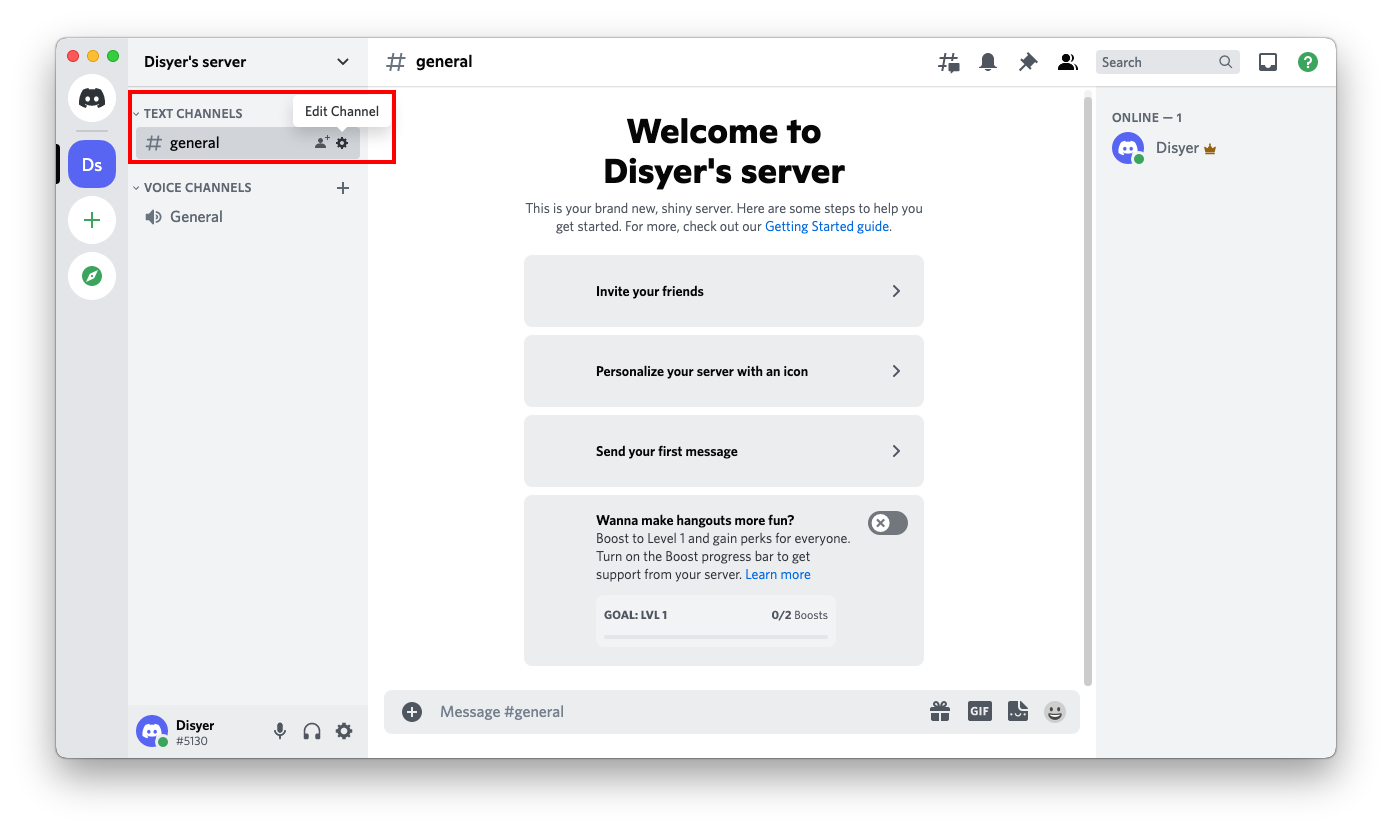
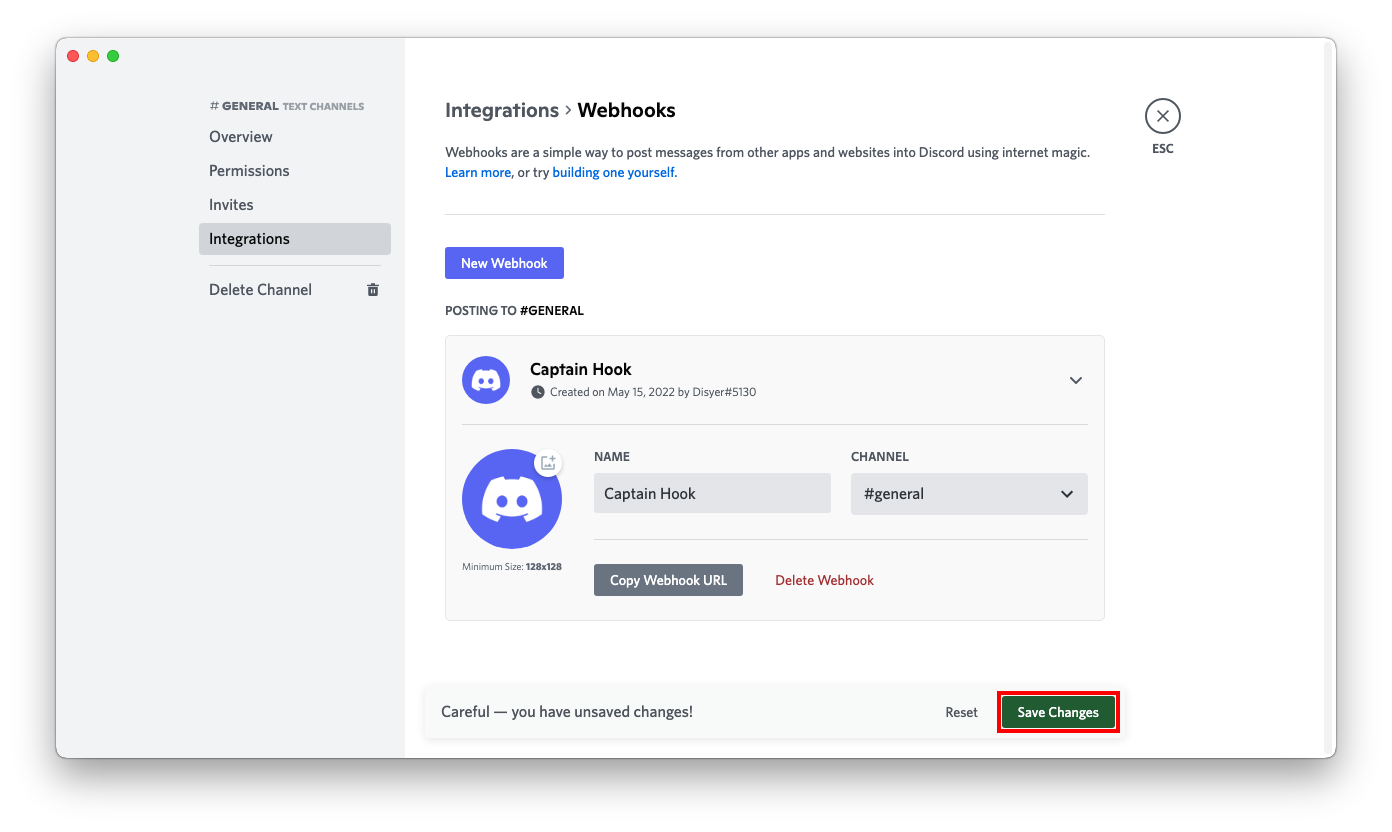
Open your channel settings by first clicking on the gear icon next to the name of the channel.
-
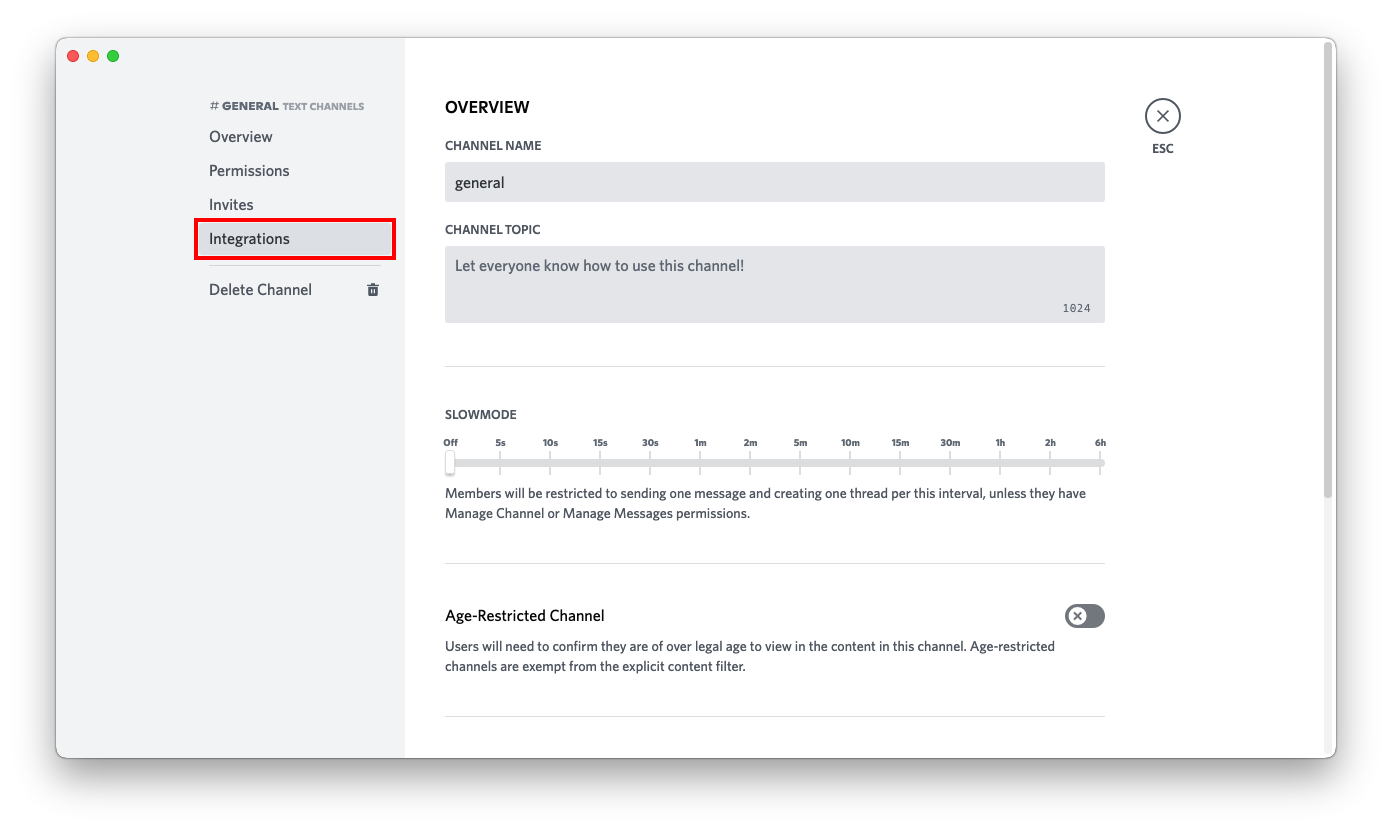
In the menu on the left, click on Integrations.
-
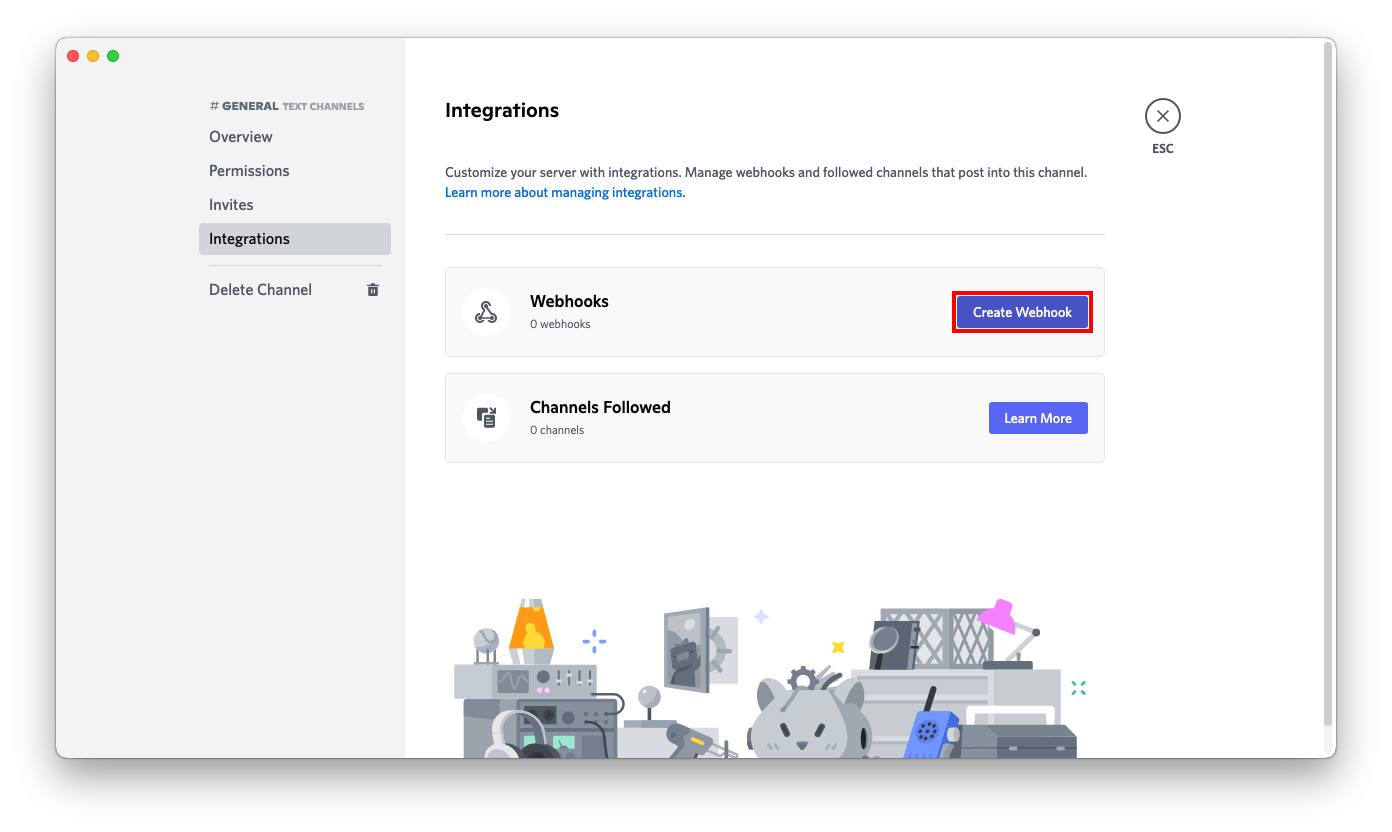
In the menu on the right, click on Create Webhook.
-
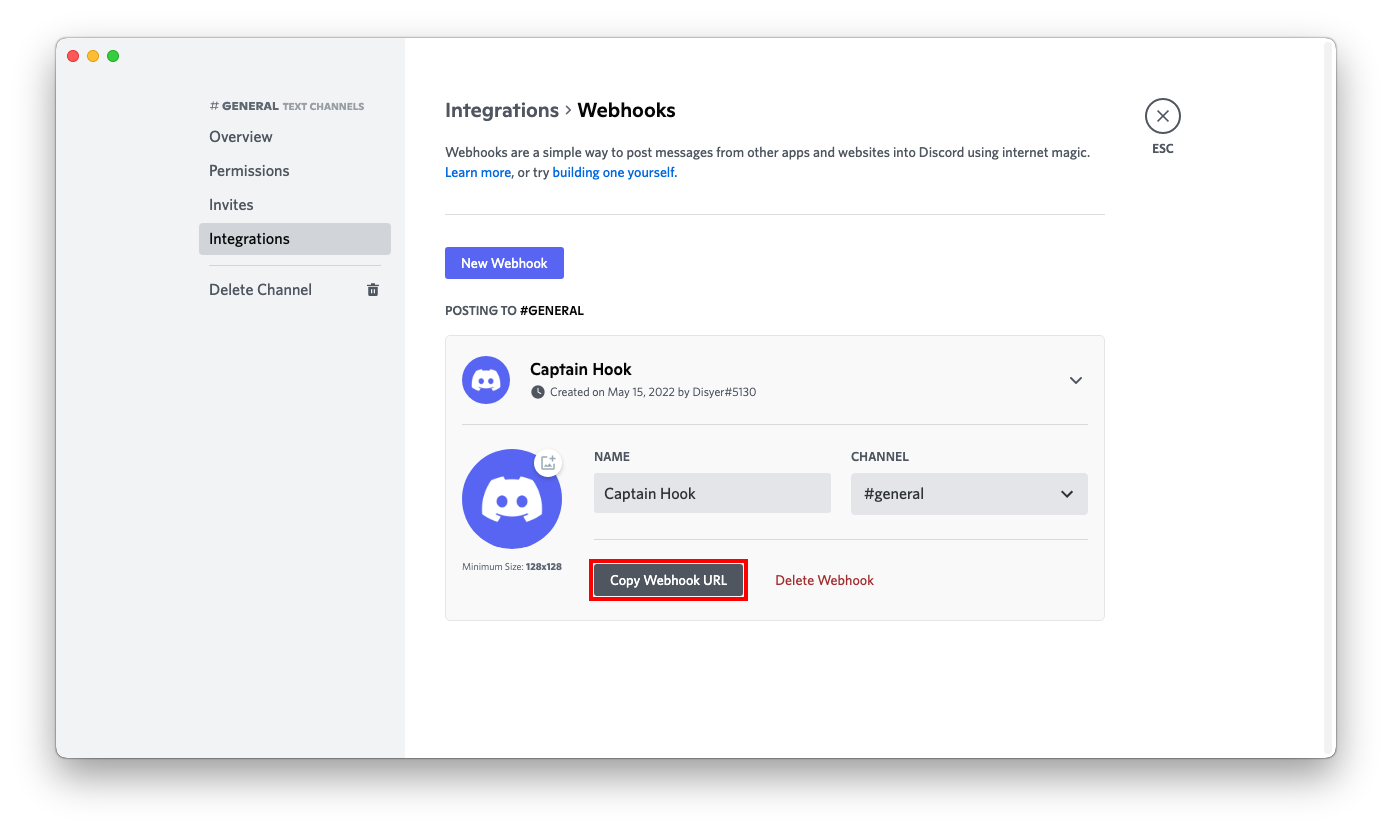
Set the name, channel, and icon to your liking and click the Copy Webhook URL button.
-
Press the Save Changes button.
-
Format the service URL:
https://discord.com/api/webhooks/693853386302554172/W3dE2OZz4C13_4z_uHfDOoC7BqTW288s-z1ykqI0iJnY_HjRqMGO8Sc7YDqvf_KVKjhJ
                                 └────────────────┘ └──────────────────────────────────────────────────────────────────┘
                                     webhook id                                    token

discord://W3dE2OZz4C13_4z_uHfDOoC7BqTW288s-z1ykqI0iJnY_HjRqMGO8Sc7YDqvf_KVKjhJ@693853386302554172?thread_id=123456789
          └──────────────────────────────────────────────────────────────────┘ └────────────────┘ └─────────────────┘
                                          token                                    webhook id           thread id